The product manager for every Claude Code agent on your machine.
Sprat is a board in your terminal that watches every Claude Code session you run. When an agent stalls, it finds out why and gets it moving again. When a usage limit resets, it picks the work back up. And it brings you only what only you can decide.
curl -fsSL https://sprat.dev/install.sh | sh
brew install sprathq/tap/sprat
0.4.7 · free and open source (MIT) · macOS and Linux · runtime bundled, no Elixir needed · nothing is sent to sprat.dev
 SPRAT ><>   ● 7 working  ✓ 2 finished                              mon 23 nov  14:02 · pm $2.40/15

 ON THE RAIL ─ what needs attention ──────────────────────────────────── yours first, oldest left ─
 ┏━━━━━━━━━━━━━━━━━━━━━━━━━━━━━━┓ ┌──────────────────────────────┐
 ┃  40M  sprat tipjar           ┃ │   9M  sprat homescout        │
 ┃ usage limit; resumes         ┃ │ following up: told the       │
 ┃ payouts with the resume      ┃ │ agent the search API key is  │
 ┃ prompt when it resets        ┃ │ in .env.local                │
 ┃                              ┃ │                              │
 ┃ ⏎ details                    ┃ │ ⏎ watch                      │
 ┗━━━━━━━━━━━━━━━━━━━━━━━━━━━━━━┛ └──────────────────────────────┘

 THE LINE ─ every project, worst first ────────────────────────────────────────────────────────────
 project      roadmap            working on                         agents        sprat is autonomy
 homescout    4 4/9  ▰▰▰▰▱▱▱▱▱▱  search API · inferred              ◌ ◌       following up  propose
 cupful       C 3/9  ▰▰▰▱▱▱▱▱▱▱  shared points ledger               ✓ ● ● ◌       watching      act
 liftlog-ios  B 5/10 ▰▰▰▰▰▱▱▱▱▱  onboarding screens (B.5)           ✓ ●           watching      act
 liftlog      A 7/10 ▰▰▰▰▰▰▰▱▱▱  merch checkout                     ● ●           watching      act
 forge        3 2/7  ▰▰▰▱▱▱▱▱▱▱  admin MCP tools                    ●             watching    watch
 dreamboard   2 2/8  ▰▰▰▱▱▱▱▱▱▱  onboarding copy                    ◌             watching      act
 tipjar       1 4/5  ▰▰▰▰▰▰▰▰▱▱  payouts · limited                           resumes 15:10      act
 studio       no roadmap yet · r propose                            ●             watching  propose
 fieldnotes   ✓ all phases done                                                                 act


 ←→ ticket  ↑↓ project  ⏎ open  x dismiss  a activity  space talk  b brief  / command  ? help
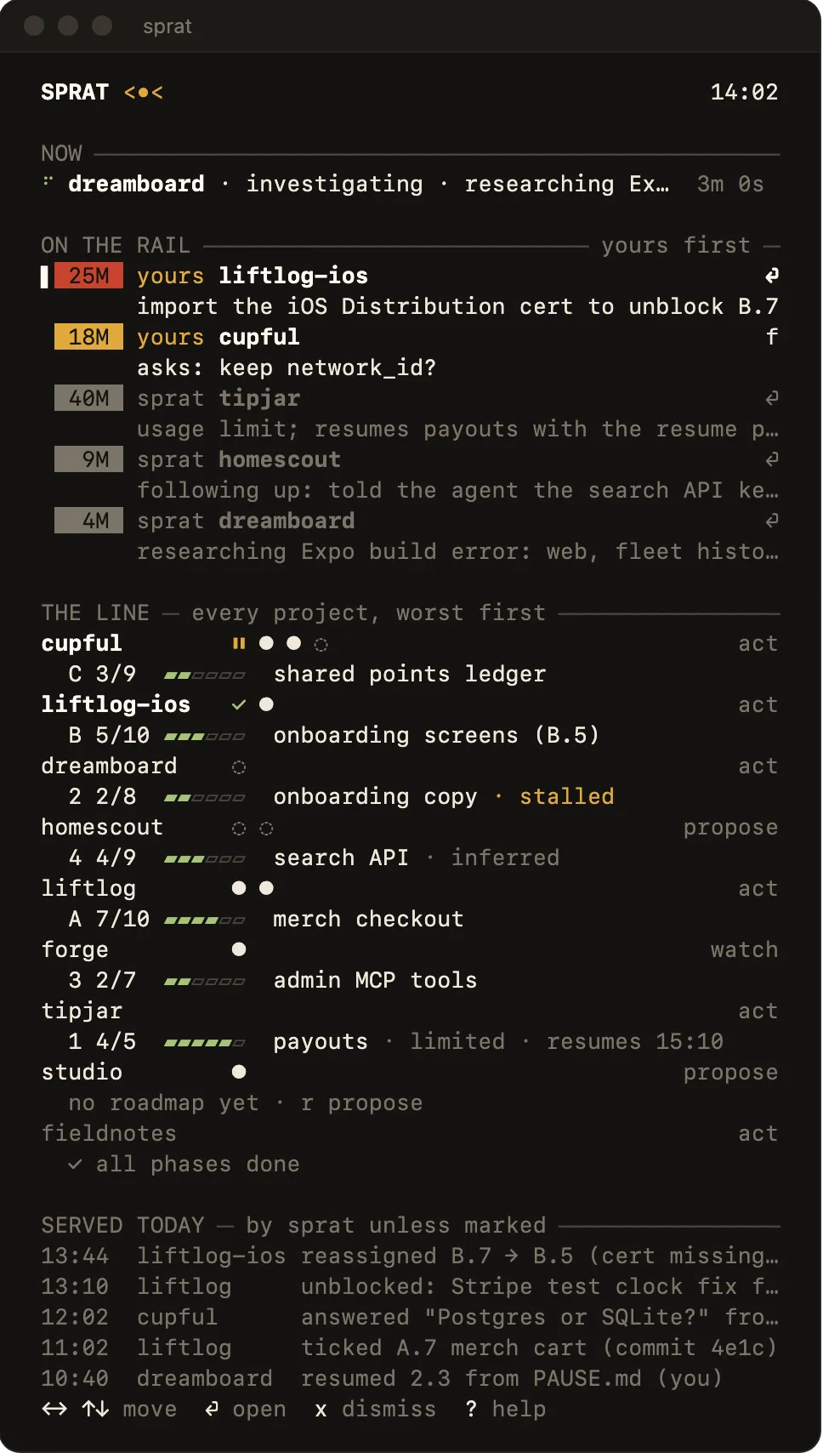
Sprat watches every Claude Code session on your machine, and where each project stands on its roadmap.
You run many projects at once, each moved forward by Claude Code sessions. Nobody watches all of them.
- 2H A session asks you a question and waits two hours for an answer.
- 40M Another retries the same failing command for forty minutes.
- 1D A third finished a plan step yesterday, and nothing has started the next one since.
You find these late, one terminal at a time. Sprat finds them as they happen and deals with them the way a product manager would.
The loop
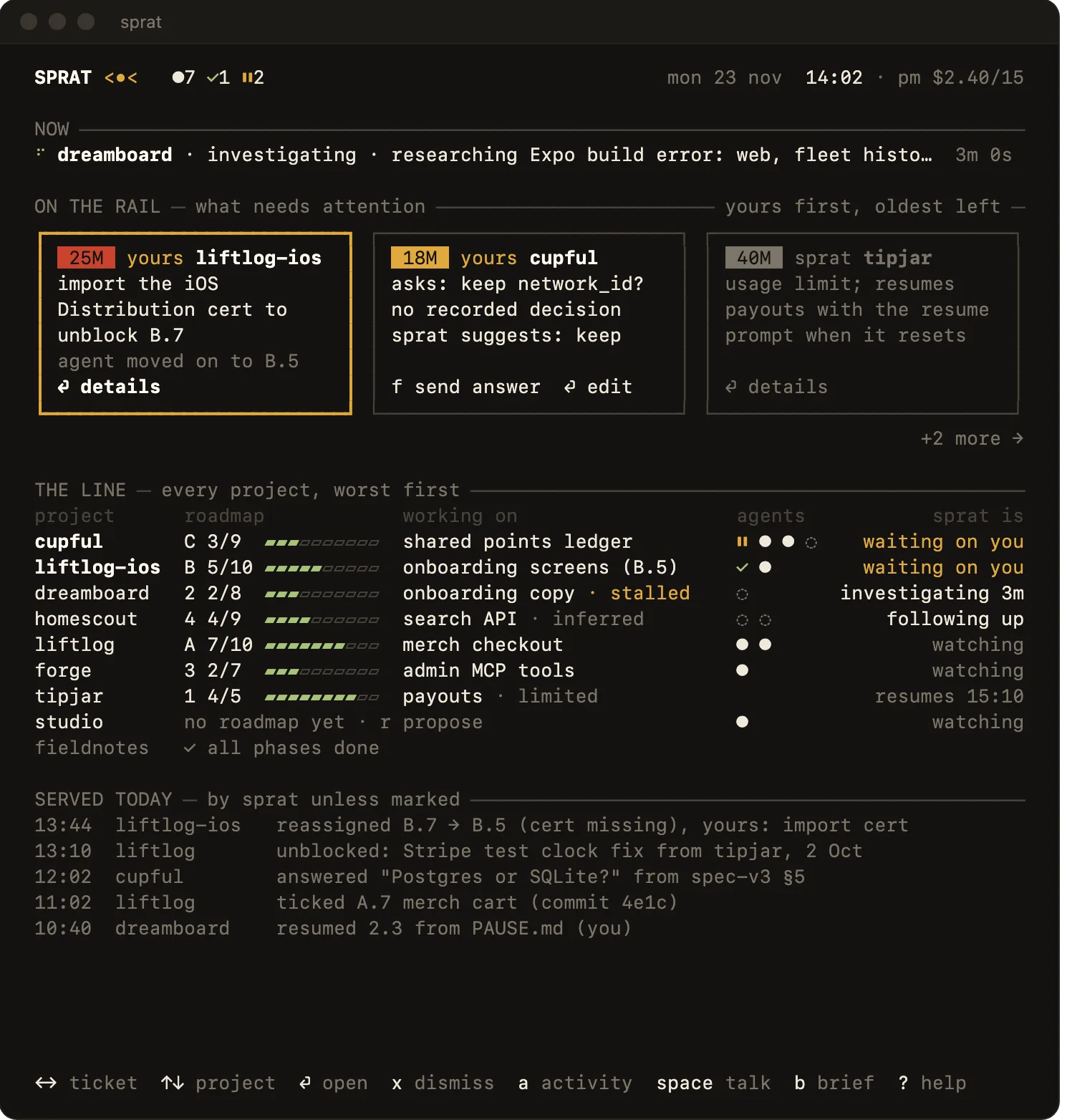
Watch it go round once. An agent stalls and Sprat clears it alone; then another asks something only you can answer, and it waits for your one keypress.
Every Claude Code session on your Mac, and where each project stands on its roadmap. Agents work; Sprat watches.
 SPRAT ><>   ● 9 working  ✓ 1 finished                              mon 23 nov  14:02 · pm $2.40/15

 ON THE RAIL ─ clear · nothing needs attention ────────────────────────────────────────────────────

 THE LINE ─ every project, worst first ────────────────────────────────────────────────────────────
 project      roadmap            working on                         agents        sprat is autonomy
›cupful       C 3/9  ▰▰▰▱▱▱▱▱▱▱  shared points ledger               ● ● ● ◌       watching      act
 dreamboard   2 2/8  ▰▰▰▱▱▱▱▱▱▱  onboarding copy                    ●             watching      act
 liftlog-ios  B 5/10 ▰▰▰▰▰▱▱▱▱▱  onboarding screens (B.5)           ✓ ●           watching      act
 liftlog      A 7/10 ▰▰▰▰▰▰▰▱▱▱  merch checkout                     ● ●           watching      act
 forge        3 2/7  ▰▰▰▱▱▱▱▱▱▱  admin MCP tools                    ●             watching    watch
 homescout    4 4/9  ▰▰▰▰▱▱▱▱▱▱  search API · inferred              ◌ ◌           watching  propose
 tipjar       1 4/5  ▰▰▰▰▰▰▰▰▱▱  payouts · limited                           resumes 15:10      act
 studio       no roadmap yet · r propose                            ●             watching  propose
 fieldnotes   ✓ all phases done                                                                 act

 SERVED TODAY ─ by sprat unless marked ────────────────────────────────────────────────────────────
 13:44  liftlog-ios   reassigned B.7 → B.5 (cert missing), yours: import cert
 13:10  liftlog       unblocked: Stripe test clock fix from tipjar, 2 Oct
 12:02  cupful        answered "Postgres or SQLite?" from spec-v3 §5
 11:02  liftlog       ticked A.7 merch cart (commit 4e1c)
 09:52  forge         commit "Add admin tool registry"


 ←→ ticket  ↑↓ project  ⏎ open  A autonomy  r roadmap  b brief  / command  ? help
Watches every session
Sprat reads what Claude Code already writes to disk: the live session registry and
each session's transcript, in every Claude config directory on the machine
(~/.claude, every ~/.claude-*, and any
account you start with CLAUDE_CONFIG_DIR, wherever it lives).
Accounts that share folders through symlinks are still told apart, so each one's
usage limit applies only to its own sessions.
It installs nothing in your projects to start working. Your sessions stay where they are, in your own terminals, tmux panes and editors. Worktrees show up under the repository they belong to.
Sprat lives in a pane beside them. At 56 columns the rail becomes strips and every
project takes two lines; nothing scrolls sideways. NO_COLOR
and ASCII-only terminals work, because every state is a word or a glyph as well as a
colour.
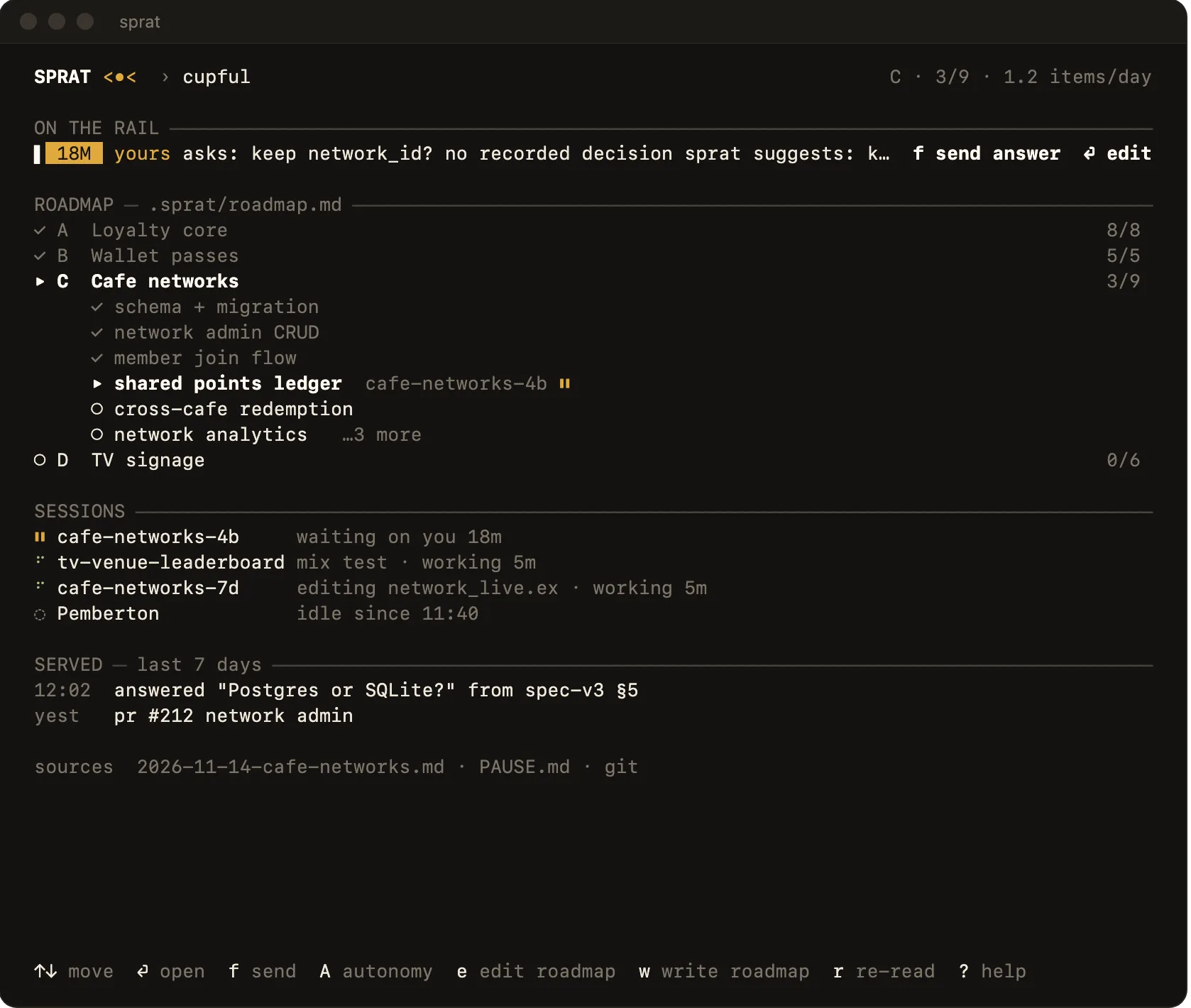
Knows the roadmap
Every project gets a position: the active phase, the active item, done out of total, and when it last made progress. Sprat reads it from the documents you already keep:
docs/PAUSE.md, the handover a paused session writes-
plan files with checkboxes:
PLAN.md,TODO.md,ROADMAP.md,docs/plans/ - numbered build phases in your specs
- git history, as evidence against items, never to invent them
Press w
to confirm it into .sprat/roadmap.md. It is plain markdown, lines
you edit win, and Sprat never adds an item on its own. Until you confirm, the
position is labelled inferred.
Progress means something landed: a ticked checkbox, a commit on the item's branch, a PR. Edits and test runs are activity, and activity does not count.
Notices stalls, by plain rules
Stall detection is code, not a prompt. Each rule cites its evidence: the transcript line, the commit, the file. A finding is raised once per piece of evidence, a dismissed one stays dismissed until the evidence changes, and a session you typed in during the last two minutes is left alone.
waiting on you
An agent asked you something and is waiting.
permission prompt
An agent is stuck on a permission dialog.
API errors
Claude itself is failing for this session.
usage limit
A wait with a known end. Sprat resumes it; see usage limits.
error loop
Retrying the same failing thing.
edit churn
Editing in circles.
spinning
Working hard, landing nothing.
roadmap stalled
Nobody is working on what is next.
left mid-step
Work was dropped halfway, with no handover.
claimed done, not done
The agent says it finished. The evidence disagrees.
idle with work left
The agent stopped early.
Exact thresholds for every rule are in the docs.
Investigates like a PM
Each finding gets a PM run: a Claude Code agent Sprat starts in the project with a budget and a fixed set of tools, reaching for them roughly in this order.
- The evidence
- The finding, the condensed transcript tail, the failing lines.
- The roadmap
- The active item, what depends on it, what is unblocked, and the decisions already written in your specs and plans.
- Memory
- The project's CLAUDE.md, Claude's auto-memory for the project, docs/PAUSE.md, and your MemPalace if you run it.
- Fleet history
- The same error in any of your other projects' transcripts, and the turns that fixed it.
- The code
- A read-only look at the repository and its git history.
- Research
- Docs, issue trackers, changelogs and error messages on the web.
- A check
- Your test or build command, run in a throwaway worktree, never in the agent's checkout. Allow-listed per project.
The PM never gets Edit, Write or a general shell. It finds and decides; the agent does the work, so each checkout keeps one writer and Sprat never touches your application code.
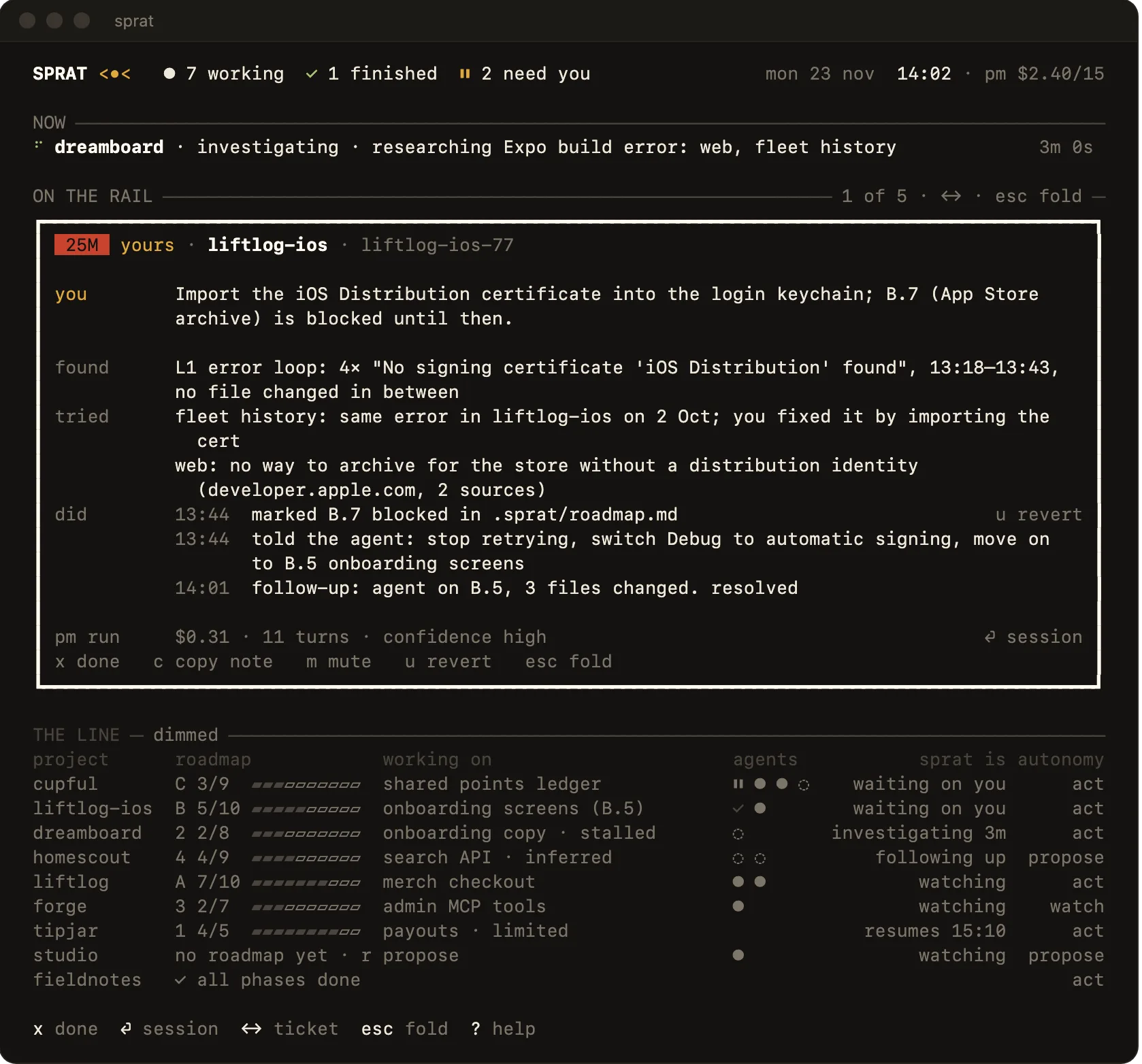
Acts
A PM run ends in one decision. Code checks it against the guardrails before anything is delivered.
- unblock
- Sends the agent the fix or the missing fact, where it came from, and the next step.
- answer
- Answers the agent's question from a decision you already wrote down, quoting where ("spec-v3 §5: Postgres, not SQLite").
- reassign
- Marks a blocked item blocked in .sprat/roadmap.md with the reason, and hands the agent the next unblocked item in the same phase.
- resume
- Writes a resume prompt for a project with an active item and no live session. Under act+resume, Sprat starts the session itself.
- wait
- No message. The agent is making real progress the rule misread; the finding is snoozed with the reason.
- escalate
- A yours ticket on the rail, with everything the PM already ruled out.
Messages go into the live session through cmux or tmux, typed only into an empty
prompt with no dialog open and never while you are typing. Without either, Sprat
copies the message and names the session, so you paste it. Every message starts
with [sprat] and ends with the roadmap item it serves.
Thirty minutes later Sprat checks whether the stall cleared and whether progress followed. Resolved, the ticket slides off and a line goes into served today. Unresolved, the next run starts from what was tried; after three, it comes to you with the whole history.
SERVED TODAY ─ by sprat unless marked
13:44  reassigned B.7 → B.5 (cert missing)
13:10  unblocked: Stripe test clock fix from tipjar
12:02  answered "Postgres or SQLite?" from spec-v3 §5
11:02  ticked A.7 merch cart (commit 4e1c)
Brings you only what is yours
Sprat acts as your PM, never as you. Whatever the autonomy setting, these come to you as amber yours tickets on the rail, oldest first, with what Sprat already did meanwhile:
- Credentials, accounts, money
- Keys, certificates, sign-ins, purchases, anything paid.
- Scope
- Adding, removing or reordering roadmap items. The PM may hand out the next unblocked item in the same phase; anything beyond that is a proposal to you.
- Irreversible or outward-facing actions
- Push, deploy, publish, send, delete data, migrations on shared databases. A Sprat message may never ask an agent to do one.
- Questions nobody has answered in writing
- Sprat answers only when it can cite a written decision. A judgement call is yours; Sprat's opinion goes on the ticket, labelled as its suggestion.
- Low confidence
- Any decision the PM rates low is shown to you, not acted on.
On a question nobody answered in writing, Sprat's suggested answer sits on the ticket. Edit it with e, send it with f. A reassignment still tells the agent to carry on while the one thing only you can do waits on the rail.
Talk to any session
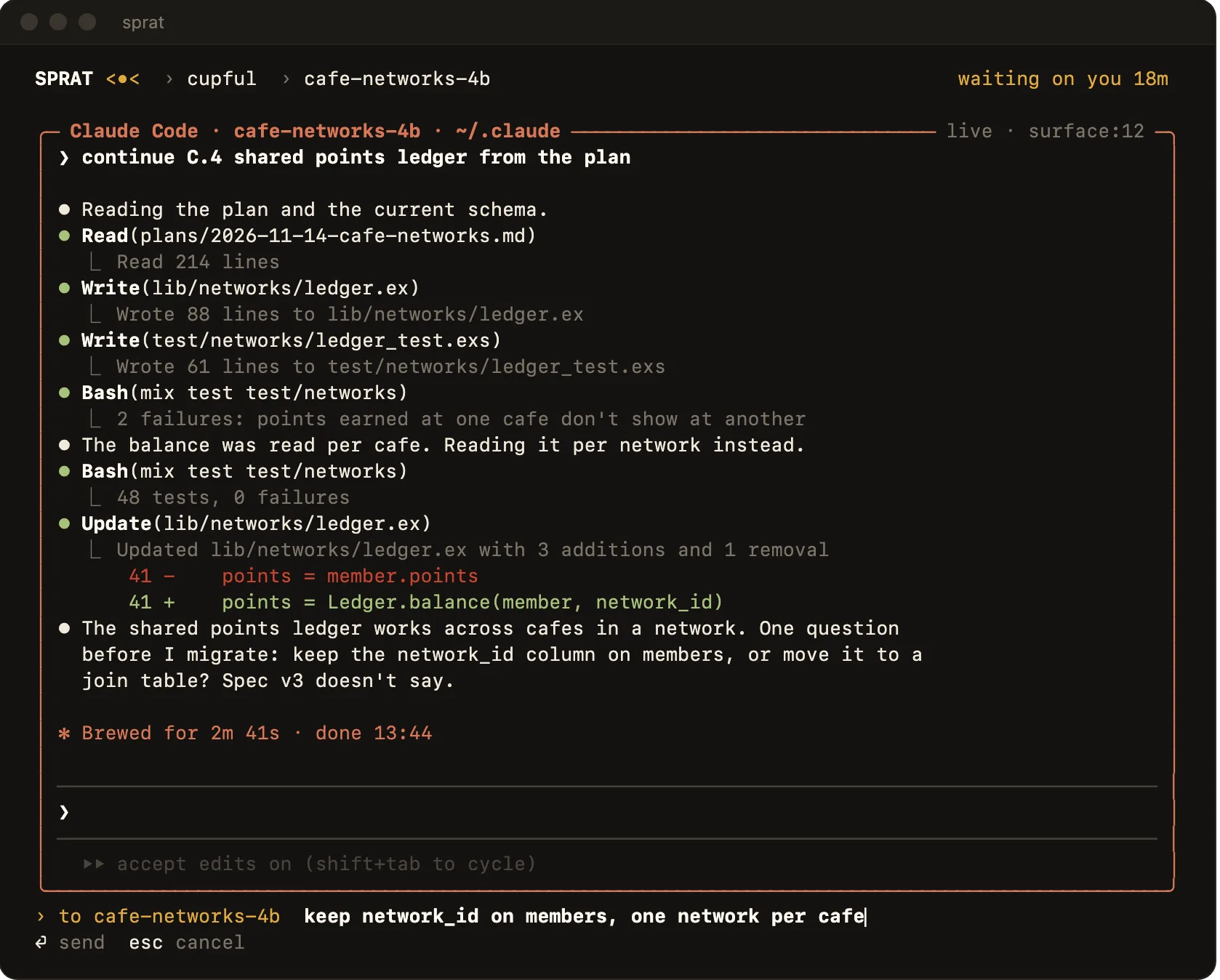
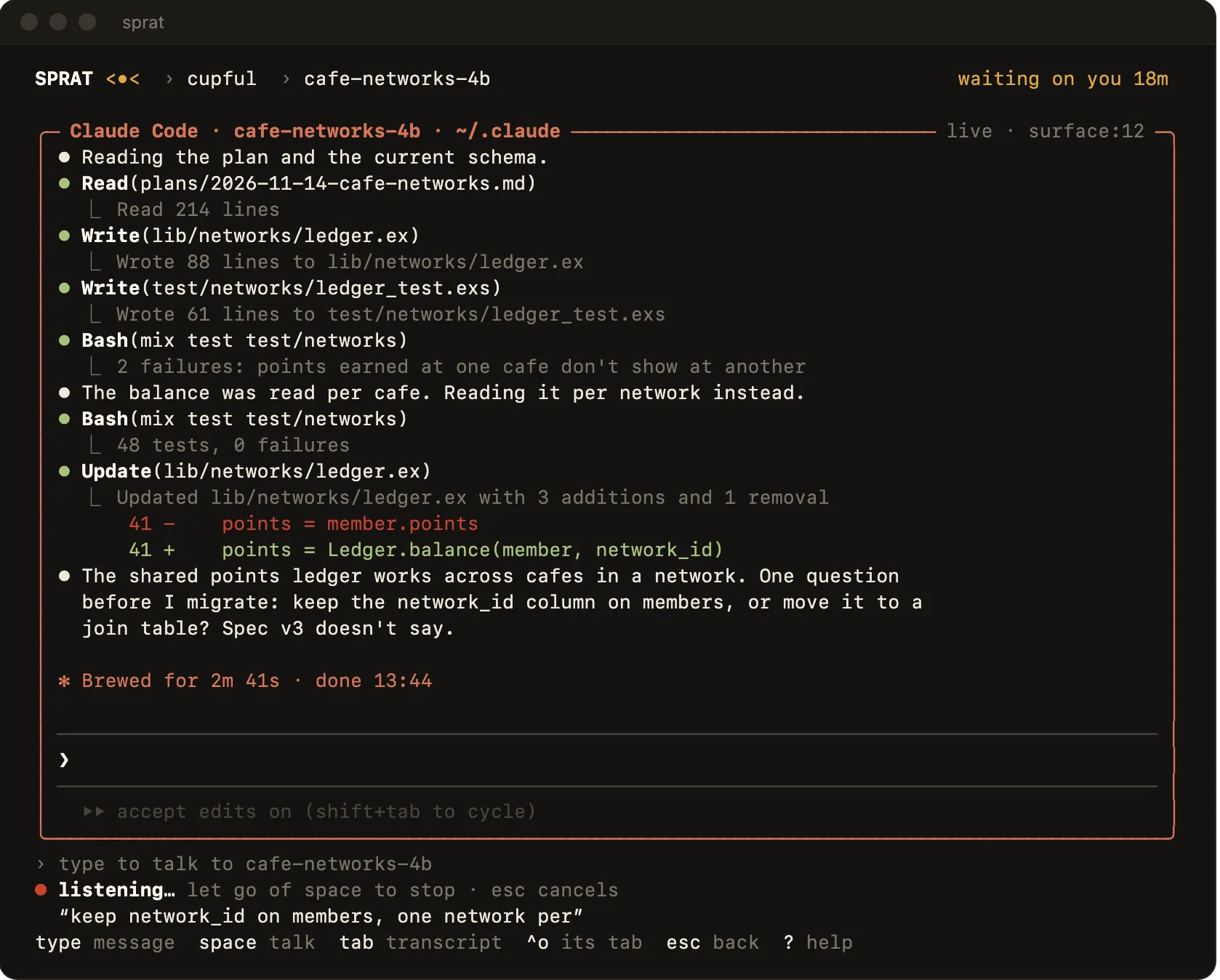
Open a session and you are looking at its own terminal, live, framed as Claude's window and in Claude's colours, so you always know whose screen it is. Type, and your words go to that agent when its prompt is free. If it is asking something, answer it from the board with the number keys.
No switching tabs to find the one agent that needs a word. ctrl-o still jumps to its own tab when you want it.
See everything it does
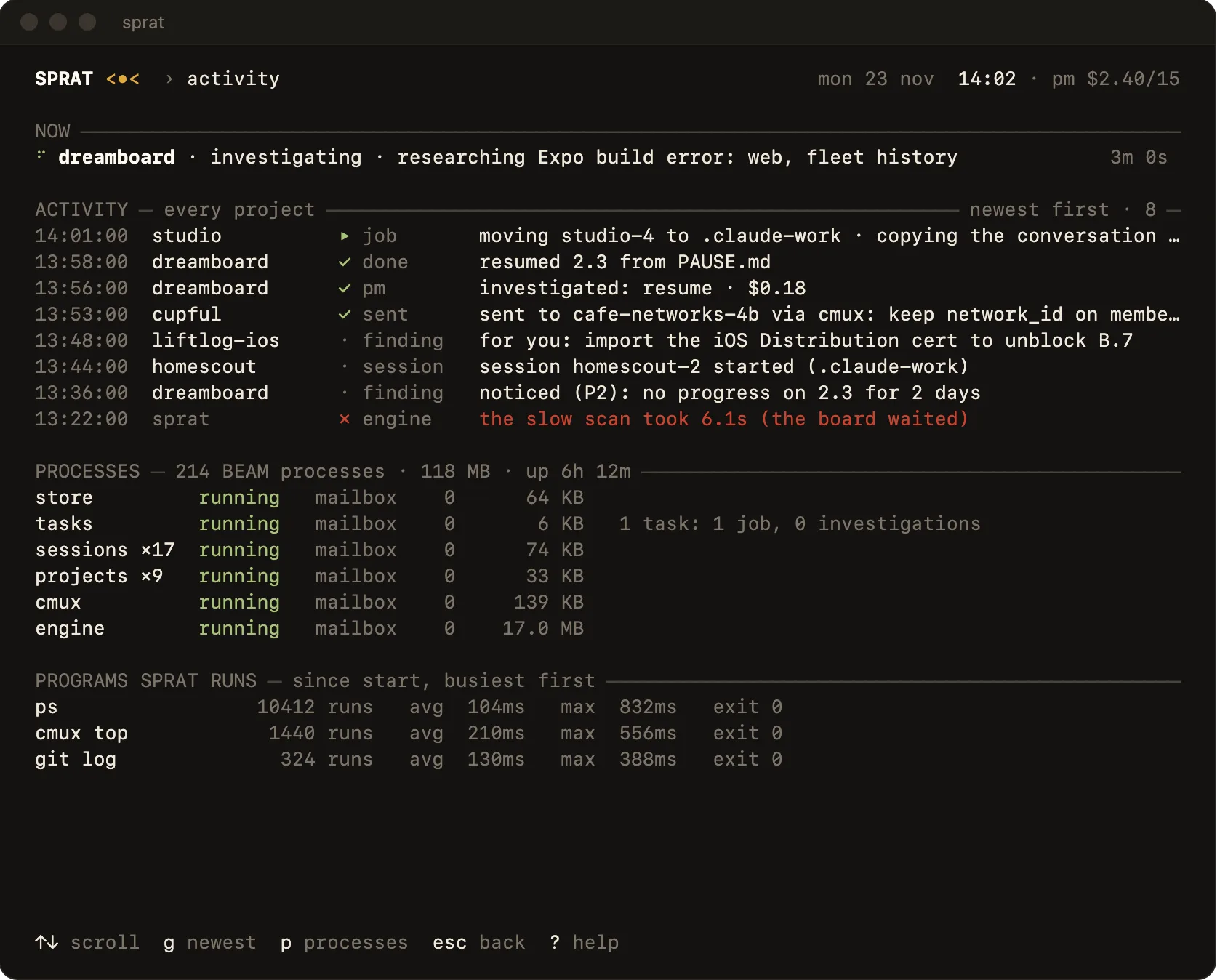
The header counts every agent at a glance: how many are working, how many just finished a turn and wait for their next prompt, how many need you. The NOW band shows what Sprat itself is doing, for how long, and how it ended: an investigation, a session moving to another account, your message going out.
Press a for the timeline: investigations, messages sent, findings, sessions starting and ending.
The same screen shows Sprat's own machinery: one process per session and per project, each with its mailbox, and the programs it runs to look at your machine, with how often and how long. Nothing happens out of sight.
Watch it think
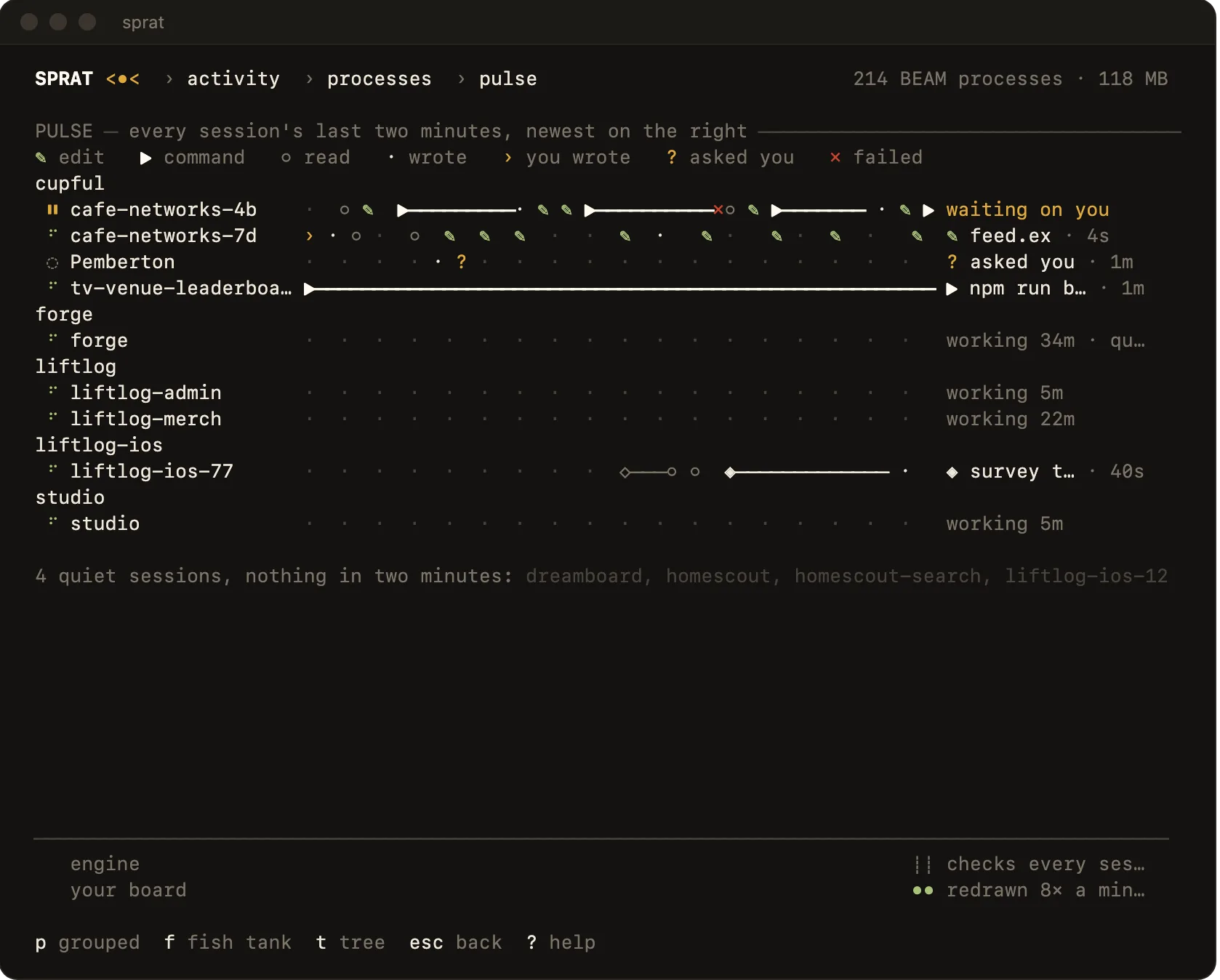
Press p on the activity screen and Sprat shows its own processes, live, as the things you know: every Claude session under its project, the last thing its watcher read, and the latest change followed hop by hop from Claude to your screen.
Press p again for the pulse: every session's last two minutes as a lane, a mark for each edit, command, read and question, a bar while a command runs. A session editing and testing, one stuck in a long build and one waiting on you each have their own rhythm. The raw supervision tree, with the messages its processes send each other, is on t.
Or as a fish tank
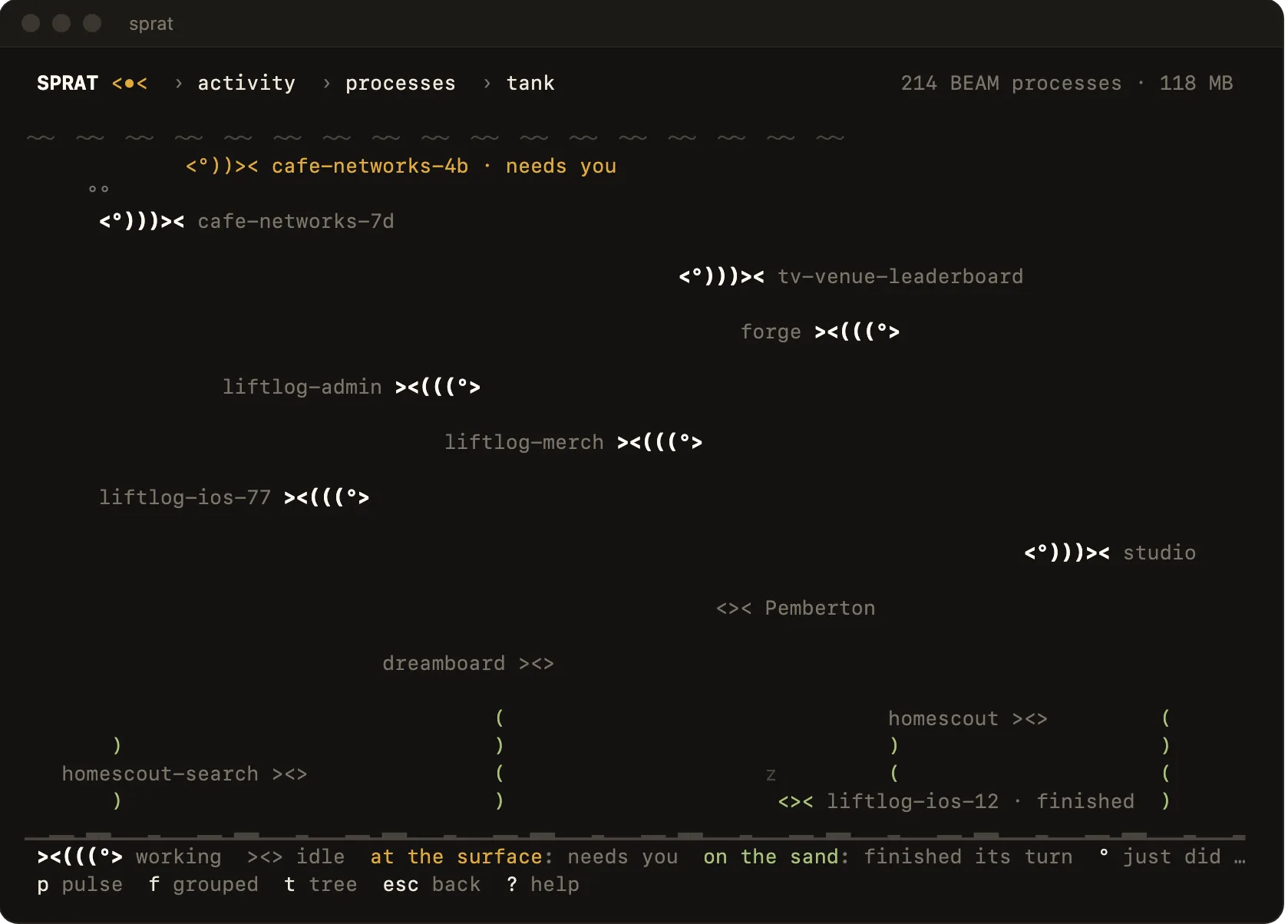
Sprat is a fish, so its sessions swim. Press f and every live session is a fish: big and quick while it works, drifting when idle, waiting at the surface when it needs you, resting on the sand when it finished its turn. Bubbles rise when it has just done something.
Leave it on a spare screen and you know, out of the corner of your eye, when a fish comes up for air.
Talk instead of typing
Hold space, speak, let go. On a session's screen your words appear as you say them and go into the message line; say “send”. On the board, a few words get you around: “open cupful”, “talk to studio”, “activity”, “help”.
Speech becomes text on your Mac, with a local whisper model. Nothing is sent
anywhere. sprat voice setup installs what it needs, asking first.
Every screen explains itself
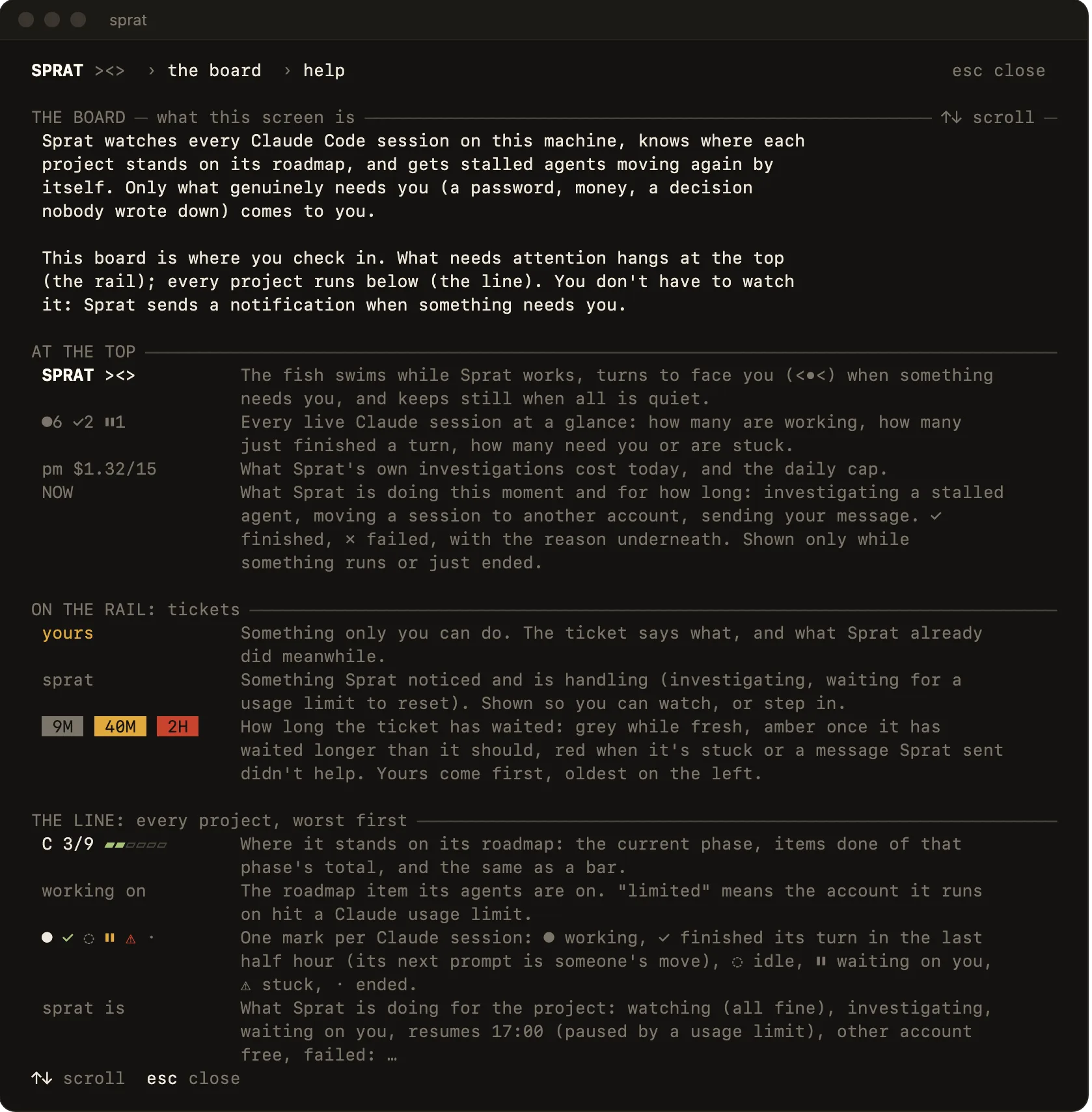
Press ? on any screen and Sprat explains that screen: what it is for, what every mark on it means, drawn the way the screen draws it, and the keys by what they do.
Autonomy, per project
You choose how far Sprat goes on each project, and can turn it down at any time.
watch
Detects and investigates. Acts on nothing.
Default for: Projects you mark sensitive.
propose
Puts every decision on the rail for you to send with f.
Default for: A newly discovered project's first 24 hours.
act
Delivers unblocks, answers from written decisions, reassignments and waits itself, and ticks items it verified done. Escalations and owner notes go on the rail.
Default for: Every project after its first day.
act+resume
As act, and starts a session itself for a resume: claude in a new worktree, headless, with the resume prompt, within the project's budget.
Default for: Opt-in, per project.
Guardrails are code, not prompts
The model's decision is an input. These checks run in code before anything reaches a session.
- Rations
- At most one message per session per 20 minutes, and three PM runs per finding. Then it escalates to you.
- Budgets
- $0.50 and 20 turns per PM run, $3 per project per day, $15 for all projects per day (defaults). At the cap Sprat drops to propose for the rest of the day and says so in the header.
- Content
- A message asking for anything on the yours list (push, deploy, delete, credentials, a new item) is refused, matched by rule as well as by the PM's own declaration.
- Roadmap writes
- Only blocked marks with a reason, and done ticks backed by a commit or a passing check. Each one is a separate event you can revert with u.
- Never twice
- The same message never goes to the same session twice, and the same answer is never given twice for one question.
- You are typing
- Anything you typed in a session in the last 2 minutes holds every delivery to it until it is quiet.
Usage limits
A usage limit is a wait with a known end, so Sprat handles it. It reads the reset time from the limit message, and marks every live session on the same account as limited, because the limit is per account. Its own PM runs on that account pause too.
At the reset, Sprat tells each session that was mid-task to continue from the step
it stopped at, one at a time and a few minutes apart, highest roadmap priority
first, so a fresh window is not spent by five agents starting together. Sessions
that were idle are left alone. If one died meanwhile, Sprat restarts it under act+resume, or puts the resume prompt on the rail for you.
Run more than one Claude account? A limit belongs to the account that hit it. When another account that has worked on the project is free, the ticket offers to carry the conversation over and continue there, in a new cmux workspace, and Sprat checks that Claude really started.
On for every autonomy level except watch.
09:12  the session
You've hit your 5-hour limit · resets 11:50am (Europe/London)

09:12  the board
payouts · limited · resumes 11:50

11:51  sprat, into the session
[sprat] Your usage limit has reset. Continue with payouts from where you stopped: wire the refund webhook.
Verify
Switch it on per project and Sprat refuses an agent's "done" while the project's own
checks fail. sprat attach
shows the Stop hook it will add to the project's
.claude/settings.json
and asks first. The checks are the lines of .sprat/checks,
seeded with the test command it detects (mix test, npm test, cargo test and others).
A refusal names each failing check, its first failing lines, and what passed. Sprat never refuses twice on the same evidence, and after four refusals in a row it lets the stop through and brings the failure to you.
Off until you attach it. sprat detach removes it.
sprat attach ~/code/cupful
# .sprat/checks: one command per line,
# run in the session's own checkout
mix test
The brief
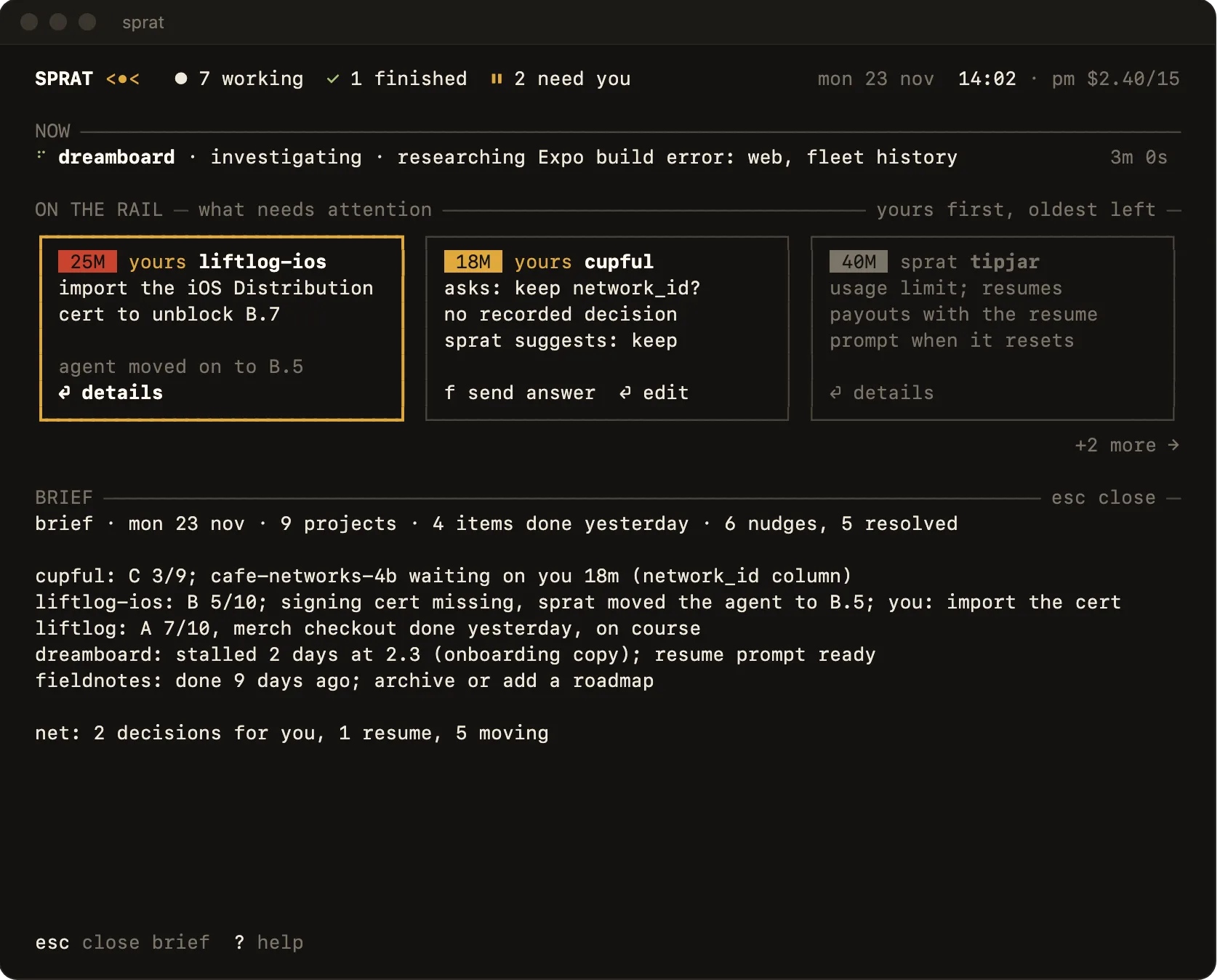
One lowercase line per project: what moved, what is stuck, what needs a decision.
Press b
on the board or run sprat brief, and it arrives once a day as a desktop
notification.
Every number in it traces to an event Sprat recorded.
Your work stays on your machine
Sprat is one process on your machine for one person. Its store, logs and roadmap copies live in a data directory on your disk. sprat.dev never receives your sessions, transcripts, roadmaps or code, and Sprat sends it nothing about how you use it.
Installing needs no account. The only file Sprat writes in a project is .sprat/roadmap.md, when you tell it to, plus
.sprat/checks
and a Stop hook if you switch on Verify.
What does leave the machine:
PM runs use your own Claude subscription through claude -p,
so the transcript excerpt a run needs goes to Claude, the provider the session already
uses.
Web research sends the PM's search queries. The PM is told never to put code, secrets,
customer data or private project names in them, and every query is logged and listed
in /stats.
Questions
- What is Sprat?
- A terminal board for people who run many Claude Code sessions at once. It watches every session on your machine, knows where each project stands on its roadmap, gets stalled agents moving again by itself, resumes work when a usage limit resets, and brings you only what only you can decide.
- Does Sprat start or host my Claude Code sessions?
- No. Your sessions stay in your own terminals, tmux panes and editors. Sprat reads what Claude Code already writes to disk and, when it needs to, types into a session through cmux or tmux, only into an empty prompt.
- What happens when a session hits a usage limit?
- Sprat reads the reset time, marks every session on that account as limited, and at the reset tells each session that was mid-task to continue, a few minutes apart. If another of your Claude accounts is free, it offers to carry the conversation over and continue there.
- Does it work with several Claude accounts?
- Yes. It finds every Claude config directory (~/.claude, every ~/.claude-*, and any CLAUDE_CONFIG_DIR a running session uses) and keeps each account's usage limit to its own sessions, even when accounts share folders.
- Can I talk to a session from Sprat?
- Yes. Open a session on the board to see its own terminal, live, framed as Claude's window. Type and press enter to send your words to it, or answer a dialog it shows with the number keys.
- Does my code or my sessions leave my machine?
- Sprat sends nothing to sprat.dev. Its investigations run on your own Claude subscription through claude -p, so the transcript excerpt a run needs goes to Claude, the provider your sessions already use. Web searches it makes are logged so you can see them.
- What does it run on, and what does it cost?
- macOS (Apple silicon and Intel) and Linux (x86_64 and arm64). It is free, installs with one command or Homebrew, and bundles its own runtime. Investigations use your Claude subscription, under a daily budget you set.
Install Sprat
You need Claude Code installed and signed in. Then open the board in a pane beside
your sessions. Try it with SPRAT_DRY_RUN=1
first, and nothing is typed into any session.
curl -fsSL https://sprat.dev/install.sh | sh
brew install sprathq/tap/sprat